
ReachStream has helped our team bring clarity to how we manage business data. We have been using this platform for over a year and are very happy with the results that we have gotten.

Ethan Hall
Director of BD at BrightWave Analytics

Discover five dynamic products designed to help businesses find, verify, enrich, and activate high-quality business data through one unified platform.

Explore Global Business Data


Work Without Switching Tabs


Verify Every Email Address in Real-Time

From growing startups to global enterprises, revenue teams worldwide rely on ReachStream to navigate business data with greater clarity, consistency, and purpose.
One-stop Destination for B2B Data

ReachStream has become part of our daily workflow. The platform is intuitive, and it's clear that every feature has been built with real users and real business challenges in mind. This is

Sophia Adams
Sales Strategy Manager at VertexCore
ReachStream has helped our team bring clarity to how we manage business data. We have been using this platform for over a year and are very happy with the results that we have gotten.
Ethan Hall
Director of BD at BrightWave Analytics
From the initial interaction, ReachStream felt approachable. With its useful products, this platform makes it easy for all our team members to navigate swiftly through its powerful features

Grace Richardson
Marketing Director at HorizonSync
Our security-first approach combines robust data protection, privacy-focused practices, and global compliance standards to create a trusted platform for every user.

Trusted by businesses worldwide for reliable data, secure technology, and consistent quality.





From finding contacts to preparing and executing outreach, the platform supports every stage of effective prospect engagement.
Product - 1
Find the Right Contacts, Faster
Use ReachStream Prospect to explore a comprehensive view of businesses and decision makers to uncover opportunities that align with your goals.
 Advanced Company Search
 Verified Business Intelligence
 Global Contact Discovery
Scroll to explore
 Prospect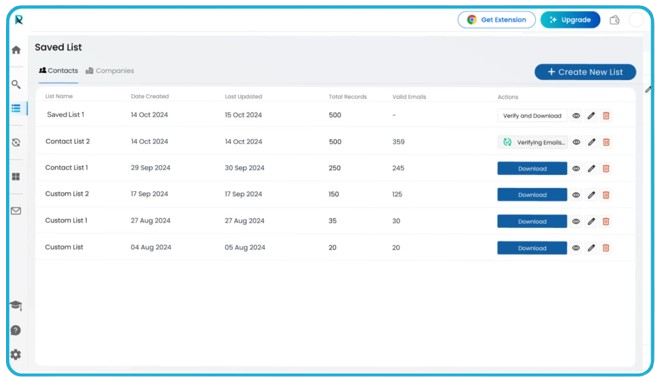
Product - 2
Discover Contacts While You Browse
Bring ReachStream into your everyday workflow with instant access to business insights while browsing LinkedIn Sales Navigator.
 Prospect in Real Time
 LinkedIn Profile Lookup
 Instant Lead Capture
Scroll to explore
 Chrome Extension
Product - 3
Maintain High-quality Email Data
Powered by the technology behind 200M+ verified email records and backed by 99.8% verification accuracy, ReachStream Email Verifier helps you maintain cleaner, more reliable contact data every day.
 Real-Time Email Verification
 Bulk-Email Verification
 API Email Verification
Scroll to explore
 Email Verifier
A closer look at the capabilities that define ReachStream and the ecosystem behind every product.

Improve outreach performance with data that ensures 90% email deliverability.

Access business intelligence spanning 150+ countries, industries, and decision-makers.

Turn contact data into deeper insights with 20+ enriched business attributes.

Combine AI-powered validation with human review for cleaner, more reliable prospect data.

Protect your business data with enterprise-grade security backed by ISO 27001:2022 and SOC 2.

Work with fresher data through records refreshed every 45 days.

Build targeted lists with data aligned with GDPR, CCPA, PIPEDA, and DPDPA.

ReachStream brings trusted business data, intelligent insights, and connected workflows together to help revenue teams create lasting value.

Reduce research time with trusted business data that helps uncover the right opportunities.


Work with verified contacts that help teams engage the right decision-makers from the start.

Use reliable business intelligence to deliver outreach that is timely, relevant, and revenue driven.

Free revenue teams from manual data work so they can focus on opportunities that drive higher ROI.
Everything we build begins with a shared commitment to thoughtful innovation, trusted data, and meaningful experiences for our customers.


1,000+
Companies

Trusted
By 3000+ Professionals

Global
Data Coverage

200M+
Accurate Contacts
 01
01Behind every connection is the right information. ReachStream was built to help businesses discover it with greater clarity and purpose.
Contacts
200M+
Accurate Contacts
Updated Daily
Companies
10M+
Business Profiles
Global Coverage
 02
02Years of continuous improvement, thoughtful design, and customer feedback have shaped the ReachStream experience you see today.
Our Approach
 TechnologyHuman ExpertiseData QualityCustomer Success
 03
03ReachStream now supports numerous organizations with 200M+ verified contacts, and an advanced email verifier that supports smarter prospecting and better deliverability.
Peoples Empowered
3K+
Across the Globe

Data Accuracy
95%
Verified Accuracy
AI + Human Verified
Access reliable data, actionable insights, and connected solutions that help businesses improve ROI and achieve sustainable growth.
Send us your queries, and our team will help you find the right solution.
Send EmailReachStream is the trusted brand behind purpose-built B2B data solutions. Whether you're discovering verified prospects with ReachStream Prospect or improving data quality with ReachStream Email Verifier, our products help you make smarter, data-driven decisions with confidence.
ReachStream provides business contact data, email verification, list-builder, CRM integrations, API access, LinkedIn data capture tools, and advanced search capabilities to help organizations manage and enrich their business data.
Yes. ReachStream’s purpose-driven products integrate seamlessly with CRM platforms like Salesforce and HubSpot. API support also enables secure connections with custom applications, websites, and business systems.
ReachStream supports businesses across all B2B industries worldwide, with deep expertise in technology, healthcare, manufacturing, education, finance, retail, and many other sectors.
Choose the ReachStream product that best fits your needs and sign up with either a free or paid plan. Whether you're looking for verified B2B data or email verification, you can get started in minutes and upgrade anytime as your business grows.